Showing posts with label 1080p. Show all posts

Saturday, August 18, 2007

My A/V Receiver Wishlist

Finally got a chance to spend some time thinking about the A/V Receivers that I would like to buy next to upgrade my old Yamaha R-V1103 receiver which I have had for about 10 years now. I must say I felt I got my money's worth with my old receiver but now with the advent of new technology it was time to upgrade.

The main criteria for selecting the receiver was:

1.) Must cost under $1600 (comparative price in India with taxes)
2.) Must have HDMI 1.3 with HDMI switching
3.) Must have 1080p upscaling
4.) Must have Ethernet port
5.) Must have streaming capability from PC's on my home network
6.) Must have iPod Docking

The top 3 receivers on my list based on the features I was looking for are (click on the images below for product details):

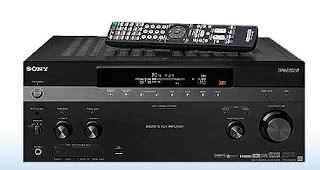
1.) Sony STR-DA5300ES Home Theater A/V Receiver (7.1 channel)


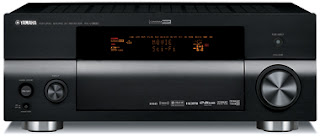
2.) RX-V1800 Home Theater Receiver (7.1 Channel)


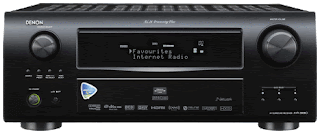
3.) Denon AVR-3808CI (7.1 channel)


I will add to this list as I find other contenders - watch this space.

Resources

Sunday, January 07, 2007

High Definition Mania

The last few months I have been really busy downloading and watching high definition content on my TV. Here's some information on where you can get the high definition content, the software you need to view it and how to use various devices to output high definition video to your LCD/Plasma TV.

What is High Definition?
Technically any video encoded at 720p (720 progressive) and above is considered high definition. The standard high definition resolutions are:
  • 1280 x 720 progressive (720p)

  • 1920 x 1080 interlaced (1080i)

  • 1920 x 1080 progressive (1080p)

The final resolution in the list above, 1920 x 1080 progressive is also called Full HD. You can see a lot of LCD TV's today with this sticker on the front. The Sharp Aquos has the AQUOS LC-46D62U in the 46" range and the Sony Bravia has KLV-40X200A in the 40", the KLV-46X200A and KLV-46X250A in the 46" and the KLV-52X200A in the 56" and the Samsung Mosel range of Full HD TVs - all of which support Full HD and are easily available in the Indian market.

Identifying the HD capability of your TV
Getting back to the point, the first step on the road to high definition is to determine what resolutions your TV supports. If your TV is HD ready, then chances are that it will only support 720p and 1080i. If your TV has a sticker on the front which says Full HD 1080p, then in addition to the two resolutions just mentioned, it will also support the full HD resolution of 1080p. If in doubt, check your TV Manual.

Enabling the appropriate HD resolution
The next step is enabling your TV to display in the HD resolution of your choice (assuming your TV supports that resolution). There are three main aspects here:
1.) The high definition video cables
2.) The high definition video source
3.) The high definition video content

Let us look at each of these in turn.

1.) High Definition Video Cables: First off you need to figure out what is the right kind of cable for your TV. This depends on the output connectors on your TV. Let us look at some of the common connectors in the order of highest resolution to the lowest:

(a) HDMI: This connector looks like this [picture]. HDMI stands for high definition multi-media interface. This is the highest quality digital connector to date providing uncompressed, all-digital audio/video interface. The HDMI 1.3 specification is the latest revision and supports output of Dolby TrueHD and DTS-HD Master Audio streams which can then be decoded by external AV receivers. HDMI can also support all the HD video resolutions mentioned above provided your TV supports it. A good quality HDMI cable will cost anywhere between Rs. 1,500 and 3,000.

(b) PC Input/VGA Connector/HD15 PC Input: This connector looks like this [picture]. The VGA connector is very similar in function to the HDMI connector with one important difference, the VGA connector has support only for digital video not digital audio. The audio part of the signal has to be handled separately. VGA supports all the HD resolutions mentioned above. If you had to choose between HDMI and VGA which one would you choose? That depends. The research I have done so far indicates that VGA can sometimes yield an poor image with washed out colors. I have not seen any such problems reported about the HDMI connector. Your results may vary, so the best bet would be to try this out for yourself and pick the connector that works for you. The PC Input connector is typically used to connect your computer to the TV - and yields amazing results compared to an conventional CRT TV. The picture is crisp, stable and flicker free - just like it is on the LCD panel of your laptop.

(c) Component: This connector looks like this [picture]. The component cable is also capable of transferring an analog video signal between your video source and your TV. The component cable has red, green and blue terminals and is a pure video connector - it does not transfer any audio signal. Component cables can do both progressive and interlaced video - and the maximum resolutions supported depends on the TV.

(d) S-Video: This connector looks like this [picture]. This is a very old technology that is on its way out. I would not recommend investing in S-Video cables or worrying about this connector. This is not a high definition video connector. Leave it alone.

(e) Composite: This connector looks like this [picture]. This was probably the most commonly used analog video connector used up to this point. Chances are your old TV was connected to your video source using the component cable. This connector supports analog audio and video. The cable has three terminals: a red and white terminal for stereo audio and a yellow terminal for the analog video signal. This is not a high definition video connector. This is possibly the worst quality audio and video - once again leave it alone.


High Definition Video Source
The video source is the driver that sends the video signal to your TV and determines the resolution that it will display it at. The video source you have must be capable of high definition resolution support. You can find out the resolutions that it supports in the user manual. I will list out some common video sources that are capable of high resolution video output.

(a) DVD Player: It is fairly common to find bugget DVD players in the market today that have an HDMI output and can display video at resolutions of 720p and 1080i. You can pick these up for between Rs. 8,000 and Rs. 12,000. There are also players that can do full HD at 1080p, but there are fairly expensive. Some examples of DVD players worth considering are the Samsung DVD-HD860 for Rs. 8,000 or the Pioneer DV-490V for around Rs. 12,000.

(b) Gaming Console: The Xbox 360 and the Sony Playstation 3 are gaming consoles that are capable of playing video at all the HD resolutions from 720p, 1080i and 1080p. The original XBox is also capable of doing video at high definition resolutions of upto 720p. It can theoritically also do 1080p, but the processor in the original Xbox is not capable of outputting frames at the rate that is required for smooth viewing. So resolutions above 720p can get very jittery and choppy.

(c) Digital Media Server: You can find a lot of media servers in the market today that are capable of playing high definition video. These are currently not easily available in India - so you will need to scrounge around for these abroad and check with friends.

(d) Home Theatre/Media PC: Today's home theatre and media PC's have the horsepower to output digital audio and video. Depending on the processor and video card and the onboard memory of your video card (and to some extent the RAM of your computer), you will be able to do video outputs at all the high definition resolutions using your home theare/media PC.

(e) Apple TV - The recently released Apple TV is really nothing but a high definition media server - but Apple being Apple - I just have to mention it separately. This neat little device is capable of either streaming digital content over the network or synching the digital content to its onboard 40 GB hard disk for playback. At the moment of writing, Apple TV only support resolutions of 720p. Using Apple TV, you can download video content, sync it wirelessly from you PC or Mac to the Apple TV box and then play it on your wide-screen TV.

(f) Digital Audio Video Receivers: The AV receiver is not a video source per se - but provides HDMI switching which is a very useful capability if you have multiple high definition video sources. The HDMI switching capability allows you to leverage the digital audio and video output capability of multiple HDMI connections and switch between them as needed. What happens here is that the receiver processes the digital audio output from the HDMI connection and amplifies it and drives your home theatre speakers and sends the digital video signal untouched to the HDMI out terminals on the back of the AV receiver - from where you connect it back to your TV. This way, you can take advantage of both the digital video and audio capabilities of your HDMI connection. Some receivers also have multiple HDMI connectors in the back panel and this allows you to connect multiple HDMI sources - this is a real blessing specially if your TV only has a single HDMI connection. If you haven't purchased an HD Ready or Full HD TV yet, I would recommend buying one with multiple HDMI inputs - if you are a audio/videophile like me where the chances of owning multiple high definition sources are quite high.

(g) Blu Ray and HD-DVD Players: You can view HD content using either a HD-DVD player or a Blu Ray player - however at the time of writing, only the PS3 with its built in Blu Ray drive is available in India. There are rumors of XBox shipping its HD-DVD drive, but when it will actually debut is anyones guess. Both these devices are designed to play high definition content in the highest possible resolutions.

(h) HDTV Tuners: HDTV tuners can pull high definition broadcast signals off the air and pipe it into your TV. This option is not yet available in India and it will be a while before channels here broadcast in high definition.

High Definition Video Content
The entire discussion above is moot if you dont have access to high definition video content. This section focuses on the high definition content available in India and how you can get hold of good HD content. The main sources of HD today are:

1.) Torrents: BitTorrent is a peer to peer technology for file sharing and you can get started quickly by installing a BitTorrent client like µTorrent, Azureus, BitTorrent, BitComet or KTorrent. You can find a bunch of really good HD stuff on the torrent sites. Seach for 720p, HD, 1080i and 1080p as search key words to find the right content. You can really find some amazing content on the torrent portals such as TorrentSpy. The BBC Planet Earth in high definition is highly recommended as is the Microcosm. These video clips will render in high definition glory on your TV and is a great way to showcase the high definition capability of your TV.

2.) HD DVD Discs: These are not yet officially available in India - but if you have access to friends abroad and also have a HD DVD player, then this is an excellent source of high definition content.

3.) Blu Ray Discs: Bly Ray is the competing format to HD-DVD - and the main difference between the two is the total maximum storage available on these formats - with Blu Ray leading the race at the moment with upto 50GB disks and HD-DVD coming in at around 30 GB. Once again, Blu Ray is not available in India - but with the release of the PS3, I am sure its just a matter of time before some Blu Ray titles will be available in India.

4.) Video games: You can also get high definition content on your video games - both Xbox 360 and the PS3 are capable of rendering games at high definition resolutions. You can control the actual resolution from the settings/options panel of your gaming console.

Putting it all together
Once you have a clear understanding of the video connectors provided on your TV and the capability of your video source to output digital video and where you can get high definition content - you can now put it all together and enjoy high definition video on your TV. You basically need to connect your video source to your TV using the appropriate high definition connector of your choice. The next step is to either stream high definition content over your network to your video player or burn a DVD disk play it in your video player. You can control the high definition resolution of the final video image from your video player - you will find this in the options or settings menu of your player.

This article is getting pretty long - so I will cut it short here. I will cover how to set up a home network for digital streaming in my next post. Let me know if you have any questions - I will be happy to answer them. Happy viewing!

Resources

Sunday, December 03, 2006

Product Review - Pioneer HDMI DVD Player - DV 490V


The Product

Pioneer HDMI DVD Player DV 490V-S is a progressive upscaling DVD player that can output video signals at resolutions of 420p/720p/1080i. It supports virtually all output connectors including, in the order of video superiority, HDMI, Component, S-Video and Composite. It also has the ability to output the audio signal with either HDMI, TOSLINK (optical digital audio connector), Coaxial or Composite connectors. Additionally it is DivX certified and also supports all common CD/DVD formats. And finally the most important feature of all - this is a universal region free player that plays both PAL and NTSC formats!

This last feature was specially important for me as I discovered that my XBox 360 was a Region 5 locked PAL system and my old Sony DVD Player is a US Region 1 player. I can now go to my local Crosswords store in Pune and buy DVD's with reckless abandon and be sure that it would work without once having to read the back of each DVD for region encoding information - trust me its a really liberating feeling!


The Features
The main features of the player are as follows:

  • Universal Region Free Progressive up-scaling DVD player

  • Universal power adapter works at 110V/230V with power cords included for both

  • Supports video output at 480i/480p/720p/1080i

  • HDMI,Component,S-Video,Composite video outputs

  • HDMI,TOSLINK, Coaxial, Composite audio outputs

  • DivX certified player

  • Plays Audio CD, VCD/Super VCD, Fujicolor CD, DVD Video, DVD-R, DVD-RW, DVD+R/+RW discs

  • Supports ISO 9660 CD-ROM containing MP3, WMA, JPEG or DivX video files

  • Supports MP3, WMA audio format playback

  • Dolby Digital, DTS


The Review

The Box: The player I got was silver colored and very light compared to my first generation Sony DVD player. The front panel sports a lot of impressive logos including HDMI, DivX, DVD and CD.

The first thing I noticed was that the on/off switch is a little hard to the touch and not very tactile - so its really hard to tell whether you have actually turned the player on (specially if the TV is still off) as the LCD panel on the front is mysteriously blank when you power up and comes on only after a while (20 seconds). I would expect to instantly see a 'Power On' message on the front panel LCD screen as soon as I turn on the device.

The open/eject button is also recessed a bit too much into the case causing you to have to really press hard to manually eject the disc. The front panel is designed to make you want to use the remote and never come anywhere near the player except to change disks.

However on a positive note, a really cool thing about this player is that the box I got shipped two power cord connectors - one for 110V AC and the other for 230V AC. This is really nice because I have my home theatre mostly running on my US 110 V equipment and could use the 110V connector to connect the DVD player to my power strip without having to fiddle around with an adapter - nice touch!

The Back Panel: The back panel was certainly more impressive than the front. Sporting all kinds of audio and video connectors you could ever want - it is complete in this respect with support for HDMI, S-Video, Component, Composite, Optical Digital (TosLink), Coaxial to name a few. Pioneer left me no room to complain on this front - err back.

The Remote: The remote sucks! Plain and simple. Its a small cheap affair in grey plastic with buttons that feel very rubbery and mushy under your fingers and require violent jabs to get working and definitely looks like it needs to be broken in before it can be used comfortably. Sad that a player with such amazing features and value - should ship with such a cheap and tacky remote.

The remote has all the usual buttons one expects - and some buttons like Display are really neatly positioned (bottom right) - this is specially helpful if you want to check the sampling rate and other audio/video details in real time while the disc is playing.

One button that I thought seemed to work rather inconsistently, was the Subtitle button - pressing this button did not always toggle the subtitles on some of the DVD's I played. I kept getting an error message despite the fact that the DVD was authored with multiple subtitles. I had to go to the DVD main menu to change the subtitle manually. I am not sure if this was a DVD authoring issue or an issue with the player/remote.

Other than this quirk, the other buttons work as expected.

The On Screen Setup Menu: This is one area where the Pioneer really shines. The interface and menus are not as slick as the XBox 360 (I wasn't expecting it to be either) but are certainly a huge improvement over my old Sony DVD Player.

The menu options are logically grouped and intuitively laid out, making it a snap to navigate. Some of the key audio and video options need to be configured before you can use the player to output high definition digital audio and video.

The Picture: And now for the main part - the picture! This is one area that the Pioneer does a great job - for the value that it comes at - it delivers a really nice crisp picture with good color rendering and saturation. Obviously it won't handle every little detail like moire patterns or eliminate every single jaggie or pixelation artifact - but for its price it does a remarkable job rendering the picture very clearly and with excellent color. I tested most of my reference discs such as King Kong, Ice Age2, Cars, Kingdom of Heaven and a few others and overall felt that I had made a really good purchase.

I downloaded a Bittorrent version of the BBC Blue Planet documentary in XivD format to test out the DivX capabilities of this player - and true enough as soon as I popped the disc in the drive, the player recognized it as an MPEG4 media. The DivX playback worked pretty well, except for one small annoying detail. The XviD output was off by a few scan lines - so I had a few of the bottom scan lines appear on the top of the display in a rather irrating fashion - but I was still able to enjoy the digital picture and audio despite this minor annoyance.

I also popped in an MP3 audio disc and used the Disc Navigator menu item to traverse the folders on the disc and play the songs I wanted. This feature works pretty well and is easy to navigate. The MP3 playback was also upto my expectations.

The only disc that did not work on this player was a Microsoft High Definition Media Showcase clip that was in a .avi format. The player did not recognize this format and refused to play this disc - my XBox 360 however had no problems playing this disc. The Pioneer supports a few documented video file formats and restricts playback to only those devices. Here is where an upgradable device like the XBox 360 really shines - being a software/hardware platform the flexibility and ability to support multiple audio/video codecs down the road is possible while it is not so easy with the DVD player where firmware upgrades are the only way to go.


Conclusion
The Pioneer DV-490S is a great value for money for the features it delivers (Region Free capability, Universal player, HDMI and 1080i upscaling are the top features in my opinion). Compared to the Samsung HD-860, this player has a better video and audio processor and more favourable reviews overall whereever I looked. There are certainly areas for improvement in the player such as a more tactile front panel and better remote but these can be overlooked as minor annoyances in the face of the excellent picture delivery that the player is capable of at that price. So overall I would recommend this as a strong buy as a backup DVD player for your XBox.

Resources:

Friday, December 01, 2006

XBox 360 Dashboard Update - II

30th November 2006:
A new XBox 360 Dashboard update is now available. You will be prompted to download the update as soon as you log into XBox Live. This update contains fixes for the following:

  • Improved support for HD video output over VGA, including 1080p resolution

  • Improved plug and play performance for wired headsets when being used with wireless controllers

  • Changes made to recently played games list to improve accuracy


This information is courtesy Major Nelson's blog. This is a very important fix for Sony/Samsung high definition TV owners as it fixes the problems related to certain Sony/Samsung TV's not being able to do 1080p on the component/VGA connector which was one of the key features of the original dashboard fall update patch. With this fix, all problems related to 1080p output over component and VGA should now be resolved.

Resources:
Major Nelson's Blog
Engadget - 1080p problem with the fall update
Engadget - 1080p fix update
AVSForum discussion of the 1080p fix

Sunday, November 05, 2006

XBox 360 Dashboard Update - I

The Fall XBox Dashboard Update is now officially available.
OK guys - its out! It was released on October 31st 2006 and is available either as an automatic download from XBox Live Online or can be downloaded by connecting your console to a broadband network. Since we do not have access to XBox Live in India - I was curious to find out if I could update my console with the latest update - and boy was I pleased with my findings.

First of all here is how you can get the update - straight from the official Microsoft Press Release:


This free update for Xbox 360™ will be distributed via Xbox Live® to all members (Xbox Live Silver and Xbox Live Gold) with no disc or hard drive required. If you don't have an Xbox Live account, you can easily sign up free by connecting your console to a broadband Internet connection. Once online, downloading the update is fast and simple, and provides instant access to many new features.


Steps to update your XBox 360


  1. Turn on your XBox and make sure it is connected to a broadband connection.

  2. Go to the XBox Dashboard and to the XBox Live tab

  3. Once there, click on the XBox Live icon.

  4. You will get a screen asking whether you are interested in joining XBox Live.

  5. Click Yes

  6. Your XBox 360 will then attempt to use your network connection to connect to XBox Live.

  7. At this point it will detect the XBox dashboard upgrade and inform you that an upgrade is available and ask you whether you would like to download it.

  8. Click Yes and the download starts - it takes about a couple of minutes (on my 512 kbps broadband connection) and you are done.

  9. Once the download has completed, it will automatically restart your XBox.


How do I check if the download worked?

  1. To confirm that the download was successful, go to the System tab of the XBox Dashboard.

  2. Click on Console Settings and select Display

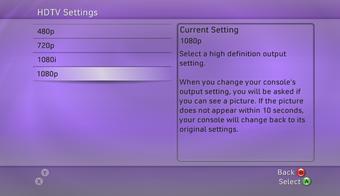
  3. Click on Display to see two options HDTV Settings and Screen Format.

  4. Select HDTV Settings and you will see 1080p as one of the output formats that you can choose.

  5. If you see 1080p on this screen, then you have updated your XBox 360 successfully.


What are the cool features included in this download?

It won't make sense for me to list all the features and duplicate information from the Microsoft website. Instead I will focus on the features that I think will most affect folks here in India:


  1. HD 1080p video mode support over VGA and component cables.

  2. Xbox 360™ HD DVD Player support.

  3. Stream WMV video from a Windows PC running Windows Media Player 11, Zune software, or Windows Media Connect.

  4. Play video from storage devices such as USB flash drives, Xbox 360 Memory Units, etc.

  5. Play video from CD or DVD data discs.

  6. Stream music, pictures and video from a Zune device.

  7. Improved visual quality of video playback.


Conclusion:


Microsoft has very strategically updated its console with 1080p support well ahead of the much anticipated PlayStation 3 release on November 17th. The timing for the 1080p and HD-DVD player support couldn't have come at a better time. Microsoft seems to have got an upper hand with a year's lead time over Sony as well as an established XBox Live online community. With the addition of 1080p support and HD-DVD support, Microsoft has checked off a couple of very important features on its checklist - and I am sure every gamer that owns an XBox 360 would be very pleased with this update capability of the console.


Resources:
Official press release from Microsoft
Details of the November 2006 XBox Dashboard upgrade
Complete list of features in the XBox Dashboard update

Saturday, October 21, 2006

XBox 360 - Trick or Treat?


XBox 360 launches in India
Having owned the original XBox console, I was elated to hear that Microsoft planned to release XBox 360 in India. The forums and articles indicated a Diwali launch - so naturally I was surprised to see the XBox launched a little earlier than schedule in Pune. I trundled down to the local store on MG Road in Pune to check out the console for myself. I was greeted by a couple of consoles perched precariously on a teetering table that looked like it would collapse under the weight of the consoles.

I went over and picked up the plastic handles connected to the console to check it out. The plastic handle came right off and the console dropped with a loud thud on the table which immediately started oscillating wildly. I clutched at the table and steadied it - and when it appeared to calm down - I re-connected the plastic handle and this time successfully hoisted the box and started reading the information on the package.

A couple of salesmen came over quickly and looked suspiciously at the oscillating table and hovered around me protectively to ensure that I didn't drop the box. Ignoring them I had a good dekko at the specs and product information on the box - I was looking for the DVD region encoding information but there was none. I asked one of the salesman whether he knew the regions that the XBox supported and whether it was region free. There was a look of panic on his face as he dashed away to find a supervisor to answer the question while the other salesman kept a watch on me to make sure I wouldn't get away.

The supervisor had a knowledgeable look of someone who has recently had an XBox orientation - so I popped the question - is this a region free DVD player? He had a startled look on this face - I suppose I had asked him a question that wasn't on his list - he went off to find someone who could find the answer. This is so typical of folks selling high end products in mass consumer stores in India - they have no clue what they are selling and chances of finding someone knowledgeable about the product is really slim. In my experience, the best folks are found in boutique stores that specialize in hi-fi systems.

I wanted to find out about the HD-DVD drive that was announced - no idea about that either. OK - do you know anything about when the XBox 360 will support 1080p - another blank stare. All right - how about whether the XBox has HDMI output connectors? Any idea when XBox Live will be launched in India? No answer there either. I gave up asking questions after that - on the way out I asked him how much the console cost - his face visibly cheered up at that question - finally one that he had an answer to!

They hadn't setup their gaming station yet - so I couldn't take the XBox 360 for a spin - the salesman said that it would be setup in a week or two. That was disappointing - I had heard so much about the wireless controller - and I wanted to try one out. Also I was curious about the interface on the XBox 360 - the one on the older XBox frankly sucked.

I also looked around and was happy to find an assortment of XBox 360 accessories - Media Remotes, Play and Charge Adapters, Extra Rechargable Batteries, HD AV cables and extra controllers (wired and wireless). They also had a bunch of games on display though I thought that the selection was rather limited.


Burning Questions:
I headed home and surfed the Internet to find out some answers:

1.) How does the HD-DVD drive interface with the XBox 360 and when will it be launched in India and what's the expected price?

HD-DVD drive is a separate unit that can be plugged into XBox 360 - so in effect you will have the standard DVD drive that comes with the XBox 360 and in addition you can attach the HD-DVD drive. The expected availability of the HD-DVD add-on in the US in November 2006 and no date has yet been announced for the India launch. The HD-DVD will act as a source of high definition content (480i/480p,720i/720p,1080i/1080p) that can be piped into a high definition monitor such as a plasma or LCD panel. Some interesting questions will be the region encoding issues around the HD-DVD and India pricing for the HD-DVD drive as well as software (none exists as of today). More details about the HD-DVD drive for the XBox can be found here. The expected retail price in the US is around $200 - no India price has been announced yet.

2.) Will the XBox 360 support 1080p high definition output? In what form will this upgrade be provided? What does it mean for me?
As of date, XBox 360 supports 720p and 1080i for most games - the official website describes support for 1080p in the form of an upgrade. Most likely the way this will work is to download the update from the website, burn a CD and pop it into the XBox 360 to update the firmware. This upgrade will allow the built in DVD player to upscale to 1080p. This raises some interesting questions about dilution of the HD-DVD drive if the built in DVD drive in the XBox 360 natively supports 1080p. Clearly there is a difference between a standard DVD player upscaling a 480p source to 1080p - and an HD-DVD drive that has access to native 1080p content which does not require scaling on the part of the DVD player. One key point to keep in mind, if 1080p is important to you, is that you need to double check whether your LCD/Plasma panel is capable of rendering at 1080p - because surprise surprise most panels in the market today only support 1080i. Read the brochures and product guides carefully before purchasing your hi-definition TV if this is important to you. As far as I know, none of the plasma/LCD models in India available today support 1080p. Read this excellent article for an in-depth insight into 1080p.

UPDATE Nov 5th 2006: Details on the 1080p upgrade for XBox can be found here.

3.) Will Microsoft provide HDMI connectors for the XBox 360? What does this mean for me?
As of today, there are no HDMI connectors provided by Microsoft - however there is a ray of hope, see this interview where Todd Holmdahl, Corporate Vice President of the XBox Product Group at Microsoft comments that Microsoft will release the HDMI connector when the market matures. If your TV has composite inputs, then HDMI is not a critical requirement. But its good to know that the XBox 360 will have support for HDMI down the road.


4.) What is the region encoding on the DVD drive in the XBox 360? Is it possible to make my XBox region free?
Region encoding is one feature I hate about the DVD specification because I have a bunch of US DVD's and some Indian DVD's and as I already have a US DVD player, I need to purchase another region free DVD player to run my Indian DVD's - what a pain!
The region encoding of the XBox 360 is set to Region 5 and of course All Region. This means that the XBox 360 will only play DVD's that have the Region 5 logo (or the All Region logo - but not always) on the back of the DVD box. This is a real pain considering that most DVD's available in India are a combination of Region 2, 3 and 5. The XBox 360 can be made region free by applying a mod - which is effectively opening up the XBox 360 and soldering a chip that changes the default behavior of the console. Please note that doing this will void your warranty and also you may not be able to log into XBox Live when it launches.

5.) Are the S-Video connectors available in India?
No - at the moment the S-Video connectors are not available in India (but available in the US). So if your TV has only composite and S-Video inputs (like mine) - then you are stuck with having to do all video on the composite input - which is the lowest video quality. This is an issue if you happen to own a US NTSC TV (like I do) which means that you will need an additional PAL->NTSC converter as the composite video signal is a PAL signal and needs to be converted to NTSC before displaying on an NTSC TV. I was initially under the impression that the S-Video connector will do away with the PAL->NTSC conversion problem, but found out later that I was wrong


6.) When will XBox live be launched in India?
I could not find an official comment on this on the official website, but the date of June 2007 has been tossed around on various websites/forums. I will update this information as soon as I have more reliable news on this topic.

The Purchase:

I finally purchased my XBox 360 Premium package on 14th October from a boutique store in Koregaon Park, Pune. It cost me around Rs. 27,500. I also picked up a couple of games - Perfect Dark Zero and Burnout Revenge to test drive the system. The games were Rs. 2500 each. The store owner was nice enough to let me take the box home without paying for it - as his credit card machine was not working. What's more he walked the XBox console and games to my car and dropped everything off - and told me to give him a call if I needed any XBox stuff like accessories or games - he would send his person over to my house to deliver. Now that's what I call customer service.

I felt what every drug junkie goes through as a mixture of adrenaline and endorphins (I need to find out if this is medically possible - but that's how I felt) surged through me as I unpacked the box and started going through the package. Here is what I got in my premium XBox 360 package:

  • XBox 360 Console
  • 20 GB Hard Disk
  • Wireless Controller with batteries
  • Power Adapter Brick
  • Standard Audio Video Cables
  • High Definition Audio Video Cables (the retailer handed this to me separately)
  • Ethernet Cable
  • Headset and Microphone Combo


Closing Thoughts
The reason I titled this article, XBox 360 - Trick or Treat? is because of the following reasons:

1.) No S-Video connectors: The S-Video connectors for XBox 360 are not available in India - forcing you to use either composite (lowest quality video signal) or component (highest quality video signal) found only on high end TV's.

2.) Region 5 DVD player: DVD Drive of the XBox 360 is set to Region 5 encoding forcing you to check every DVD you purchase in India for region compatibility and even then you cannot be sure. I recently purchased The Transporter DVD from a local Crosswords store in Pune, the disk had no region information on the DVD back cover, only upon opening the DVD did I find Region 3 stamped on the disk which of course meant that I couldn't play this on my XBox 360 or my US DVD player. So if you plan to use the XBox 360 as your primary DVD player, you can safely rule it out.

3.) No HD-DVD Drive and content in India: Lack of high definition content in India is the other pain point. HD-DVD Drive has not been announced in India and there are no HD-DVD titles available to purchase in India yet (I think it will take at least 2 years before HD-DVD is commonly available in India at a reasonable price).

4.) No XBox Live:XBox Live is not yet available in India - and is expected around June 2007 - this is another big minus for getting an XBox 360 in India.

5.) Impending PS3 release:Upcoming PS3 with the built-in Blu Ray player (as opposed to add on HD-DVD drive for XBox 360) is another negative factor - though given the lack of the Blu Ray titles in India, I think this point ranks lower than some of the other reasons above.

6.) Lack of choice in XBox 360 titles:There are only a handful of XBox 360 titles available in India - I expect this list to grow - but if you are looking for a lot of choice in games - then you are bound to be disappointed.

7.) Not backward compatible with old XBox games:No backward compatibility with the old XBox games - this is a real problem for me as I have a lot of the old XBox games. Microsoft has a compatibility chart that lists the old XBox games that will work on the XBox 360 - but I found that your results may vary.

8.) More reasons: Here are some more reasons why you shouldn't get the XBox 360 today, but keep in mind that this article was written just before the XBox 360 launch.

Bottomline
The bottom line is whether it makes sense to buy an XBox 360 today - or wait till the situation improves in terms of titles and accessories and online gaming. Also whether it might make more sense to wait for the PS3 launch and get access to hundreds of PS2 and PS3 titles (PlayStation has better backward compatibility compared to XBox) and the built-in Blu Ray drive (future proofing your purchase). In my mind its a wash - to be honest I don't see a real strong reason to purchase an XBox 360 today - unless you are an early adopter and don't mind paying the premium for getting to play with new technologies as they are released with the inherent risk that either a new generation product is launched a short while later or the product becomes obsolete very quickly(The DreamCast was a big mistake in my case - it's my favorite paperweight today). Don't get me wrong - I am all for purchasing an XBox 360 in India today and enjoying the awesome gaming experience it provides - as long as you are aware of all the caveats. The choice is yours, I hope this article provided some insight into important decision making points before you take the plunge. Happy Gaming and Happy Diwali!

Resources:
Official XBox US Website
Official XBox India Website
XBox India Store Locator
How to hook up your XBox 360 - Step By Step Guide
XBox 360 1080p upgrade
CNet.com review for XBox 360